Manage service fees
This article explains how to add and manage service fees for your accommodation. You will learn how to set up different service types, such as a security deposit, cleaning fees, breakfast, tourist tax or additional charges per guest, pet or item. It also explains how to determine whether a service is mandatory, active and valid temporarily or at all times.
View current services
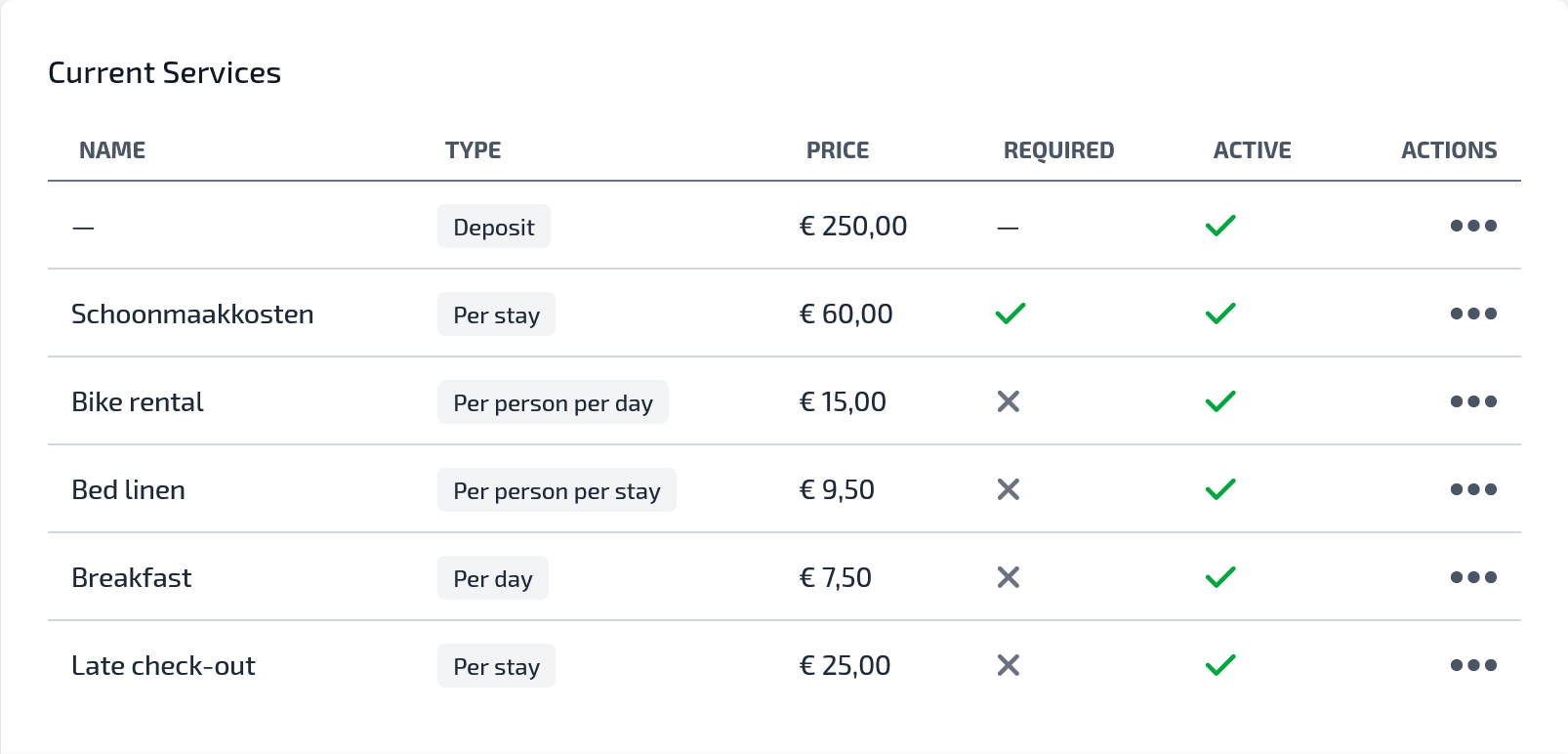
The overview shows all services that have already been added to the accommodation. For each service, the following is displayed:
- Name: the name of the service, for example Security deposit or Breakfast.
- Type: how the costs are calculated.
- Price: the amount associated with this service.
- Mandatory: whether the service is mandatory by default for a booking.
- Active: whether the service is currently active.
- Actions: options to edit or manage the service.
An example is a security deposit of € 250,00 or breakfast for € 7,50 per day.
Add service
With the Add service button, you can create a new service for your accommodation. You choose a name, price and calculation type and indicate whether the service is mandatory and active.
You can also optionally set a period for a service using Valid from and Valid until. If you do not enter a date for Valid from and Valid until, the service always applies. You only use these dates when a service needs to be active temporarily, for example during the high season or a holiday period.
This allows you to configure the cost structure of your accommodation flexibly. You can add both fixed costs and costs that depend on the number of nights, days, people, children, pets or items.
Common examples
Security deposit
A security deposit is often used to cover any damage or additional costs after the stay.
- Name: Security deposit
- Type: Security deposit
- Price: € 250,00
- Mandatory: yes
This is useful for holiday homes, villas or apartments where you want to clearly show in advance that a security deposit applies.
Cleaning fees
Cleaning fees are usually charged once per stay.
- Name: Final cleaning
- Type: Per stay
- Price: € 85,00
- Mandatory: yes
This is a commonly used setting when the accommodation is professionally cleaned after every stay.
Breakfast
At B&Bs, guesthouses or accommodations with additional services, breakfast can be offered separately.
- Name: Breakfast
- Type: Per person per day
- Price: € 12,50
- Mandatory: no
When breakfast is optional, guests can choose whether they want to use this service.
Pets
If pets are allowed, you can set separate charges for them.
Example per pet:
- Name: Pet
- Type: Per pet per stay
- Price: € 25,00
- Mandatory: no
Or if you charge one fixed amount for all pets together:
- Name: Pet surcharge
- Type: All pets per stay
- Price: € 40,00
- Mandatory: no
This is useful when you charge additional cleaning fees for guests who bring a dog or another pet.
Extra bed or cot
For additional items, you can set a charge per item.
- Name: Cot
- Type: Per item per stay
- Price: € 15,00
- Mandatory: no
You can also use this for additional bed linen, towel packages, bicycles, barbecue packages or other rentable extras.
Tourist tax
When tourist tax is charged separately, you can set it per person per night.
- Name: Tourist tax
- Type: Per person per night
- Price: € 2,50
- Mandatory: yes
This is particularly useful when the tax depends on the number of guests and the number of nights.
Available service types
You can choose from different service types depending on how the costs should be calculated:
- Price included: the service is included in the price.
- Security deposit: a security deposit amount for the stay.
- Per stay: one fixed amount per booking.
- Per night: amount per overnight stay.
- Per day: amount per day.
- Per person, adult, child or baby: costs depending on the type of guest.
- Per pet or all pets: costs for pets.
- Per item: costs for additional items or amenities.
This allows you to configure both simple and more extensive pricing models to suit your accommodation.
Active or mandatory
A service can be active or inactive. Only active services are used or displayed for the accommodation.
You can also indicate whether a service is mandatory. A mandatory service is included by default in a booking. Examples include cleaning fees, a security deposit or tourist tax.
Optional services can be used for extras such as breakfast, towels, cots, pets or parking spaces.