Managing reservations
With Homadu, you receive reservations directly through your own rental website. In the reservation overview, you can see which guests have requested or booked a stay, the period involved and the current status of the reservation. This makes it easy to keep track of new requests, confirmed bookings and cancelled reservations.
Where can you find your reservations?
You can find your reservations in the Homadu dashboard under Bookings.
On this page, you can see an overview of all reservations received through your rental website. This allows you to quickly check which bookings are new, which have already been confirmed and which still require attention.
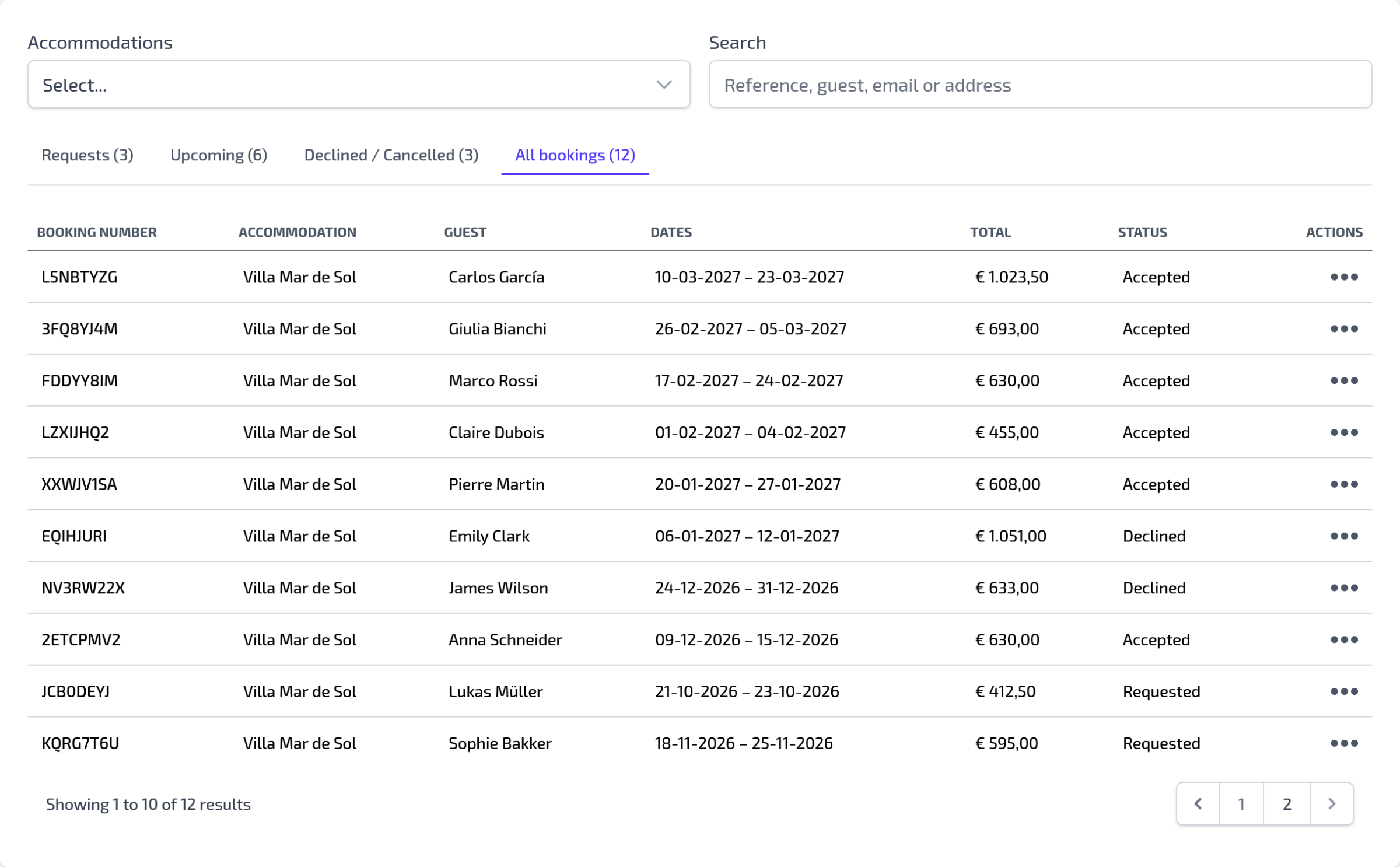
What can you see in the reservation overview?
In the reservation overview, you can see the most important details of each reservation. For example:
- the guest’s name;
- the accommodation for which the reservation was made;
- the arrival and departure date;
- the number of guests;
- the total price;
- the status of the reservation;
This allows you to see at a glance which reservations are current and which actions you may still need to take.
Viewing a reservation
When you open a reservation, you can see more details about the booking or request.
Here you will find, among other things, the guest’s contact details, the selected stay period, the number of people and any comments the guest entered when making the reservation.
You can use this information to contact the guest, make additional arrangements or further process the reservation.
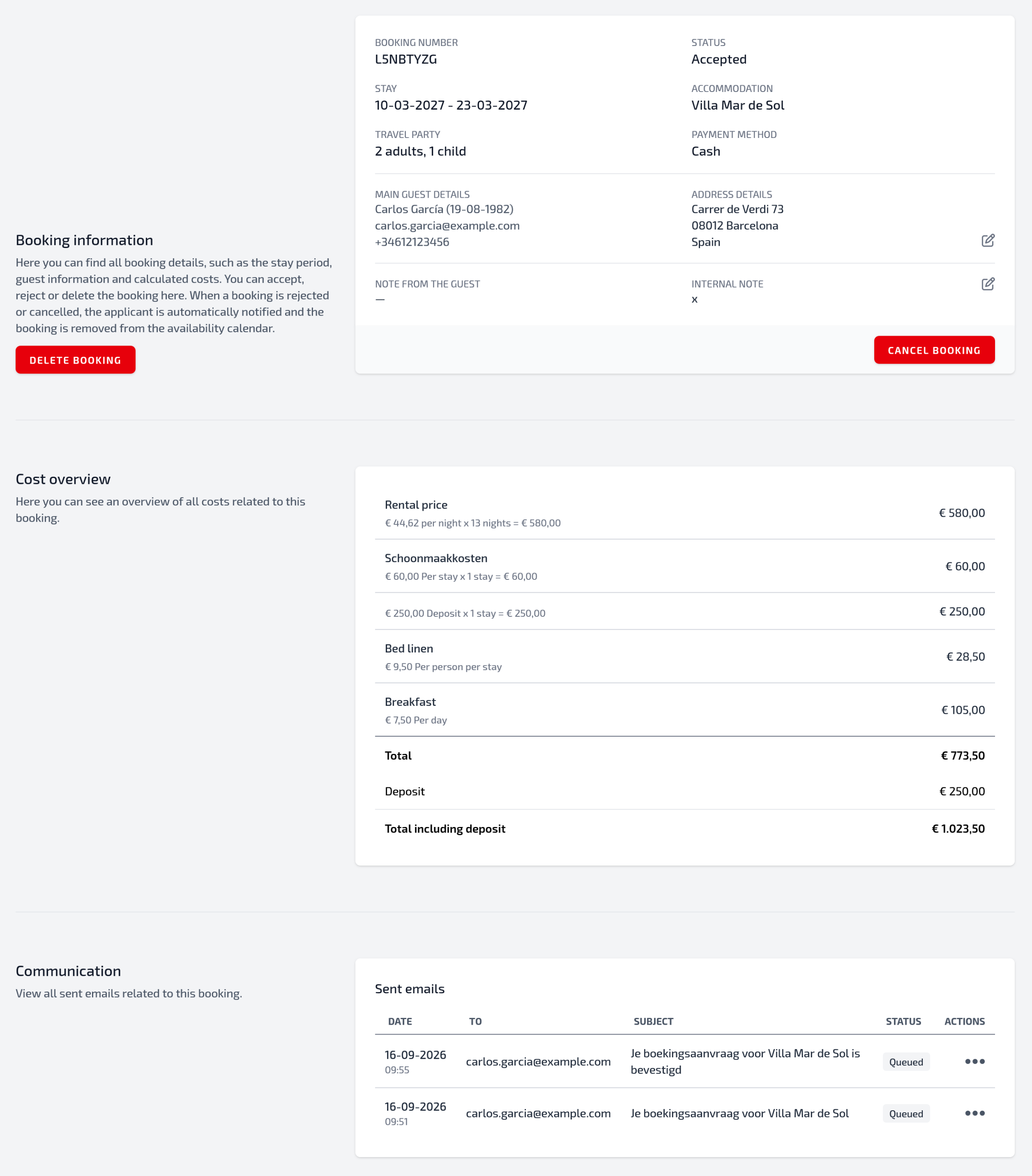
Changing the status of a reservation
A reservation can have different statuses. The status helps you keep track of the progress of each booking.
Examples of statuses are:
Requested
The reservation has been received but has not yet been definitively confirmed.
Accepted
The reservation has been accepted and the period has been reserved for the guest.
Cancelled
The reservation has been cancelled by you or by the guest.
By keeping the status up to date, your administration remains clear and you know exactly which reservations still require action.
Contact with the guest
Homadu helps you collect reservations in one central place, but you manage further communication with the guest yourself.
You can use the contact details from the reservation to inform the guest about, for example:
- confirmation of the reservation;
- payment arrangements;
- arrival and departure times;
- house rules;
- deposit or additional costs;
- practical information about the accommodation.
Because payments are arranged directly between you and the guest, it is advisable to always clearly confirm important agreements.
Payment for a reservation
Homadu does not process payments between the host and the guest. As the host, you therefore decide how you want to arrange payment.
For example, this can be done via:
- a bank transfer;
- cash payment upon arrival;
- an advance payment;
- another payment arrangement between you and the guest.
Preferably state your payment terms clearly on your rental website or confirm them to the guest after receiving the reservation.
Checking availability
For each reservation, carefully check whether the selected period is available. This helps prevent double bookings or misunderstandings.
When a reservation is final, it is important that the availability of your accommodation is updated correctly. This allows new visitors to immediately see which periods are still available.
Do you use calendar connections with external platforms? Then also check whether your availability is being updated correctly there.
Cancelling or declining reservations
Sometimes it may be necessary to cancel or decline a reservation. For example, if a period turns out not to be available, if the guest does not meet the conditions or if a mistake has been made.
In that case, inform the guest as soon as possible and clearly explain why the reservation cannot go ahead.
Then update the status of the reservation so that your overview remains up to date.
Tips for managing reservations
Check your new reservations regularly, especially when your accommodation is being actively promoted.
Make sure you respond to requests quickly. This gives guests confidence and increases the chance that they will actually book their stay.
In addition, keep your availability up to date and always confirm important agreements in writing, for example by email. This helps prevent misunderstandings afterwards.